

Part 1: Java Environment Configuration Guide
- Download the JDK
- Download a compiler
-
- Lightweight, requires configuration
- Supports many languages, and there are many plugins too
- Free
- The best IDE in the universe!! Not really!!
-
- Bloated, ready to use right after downloading
- Suitable for projects
-
- Cloud storage, ready to use right after downloading
-
- Haven't really used it
- Free and open source
- Low system requirements
-
- Haven't really used it
-
- Haven't used it
-
- Haven't really used it
- Free and open source
- I heard it has a powerful plugin marketplace, though it uses quite a lot of memory
-
Part 2: Basic Syntax and Comments
Basic Syntax
package com;

public class Helloworld {
    public static void main(String[] args) {
        System.out.println("Hello World!");
    }
}
Comments
/*
	Multi-line comment
*/

// Single-line comment

/**
* Documentation comment
* You can write multiple sentences
*/
Note: Documentation comments can be extracted into a program documentation file
Comments do not affect program execution, because the program is run from the compiled class file
Common Data Types
-
Integers
- For example: 66, 88, -88, -66
-
Decimals
- For example: 1.1, -1.2
-
Characters
- For example: A, O, I
- In code you write: 'A', 'O', 'I'; single quotes are required, and only one character is allowed
-
Strings
- For example: I love you, "I love you", "HelloWorld"
- In code you must use double quotes, and the content can be anything
-
Boolean values
- For example: true and false
- In code you write: false, true
- There are only these two values in code, where false means "false" and true means "true"
-
Null value
- For example: NULL
- In code it is written as: Null
- In a program it is a special value; a null value represents emptiness.
-
Special characters
\nmeans a line break\tmeans a tab key was pressed, roughly leaving a gap of two characters
Variables
-
Variable definition and format
- A variable is used to store a piece of data; in essence, it is a region in memory
数据类型 变量名 = 数据;
-
Advantages of variables
- They can be used to remember the data you want to process, making the code you write more flexible and easier to manage
-
Characteristics of variables
- The data stored in a variable can be replaced
-
Using variables
- A variable must be declared before it can be used, e.g.: int age = 10;
- A variable of a certain type can only store data of that type.
- The difference between int and double
- Variables have an access scope; a variable is valid within the first {} block from where it is defined. Also, multiple variables defined in the same scope cannot have the same name.
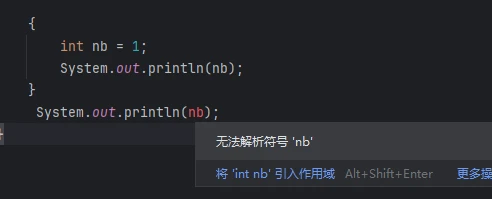
- You can declare a variable without assigning a value, but it needs a value when you use it
        int age = 10;
        System.out.println(age);
        age = 11;
        System.out.println(age);
        age = age + 1;
        System.out.println(age);

        结果为:
11
12
13
As you can see, the data in a variable can be replaced
Note: In Java, = means assignment, and assignment is read from right to left
For example: int age = 10; means assigning the value 10 to age
Keywords and Identifiers
Keywords
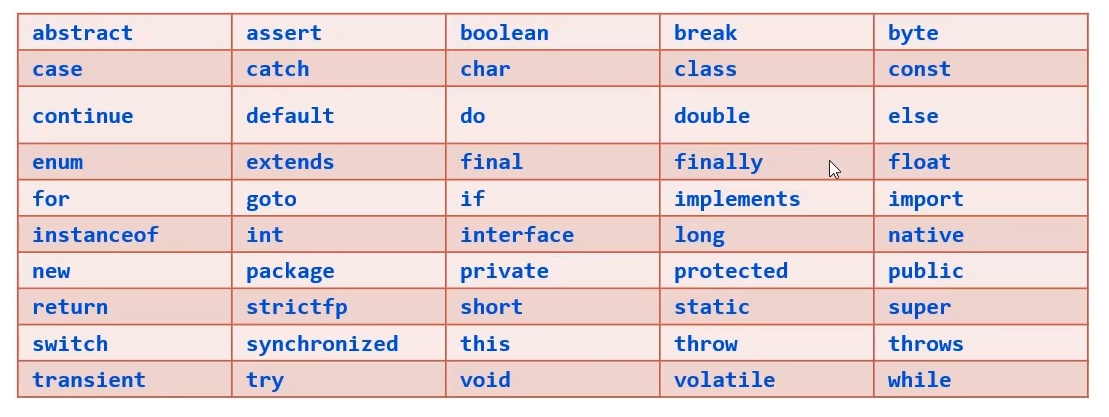
Identifiers
Composition
- Digits and letters
- The underscore _
- The dollar sign $
Requirements
- Cannot start with a digit
- Cannot use a keyword as a name
- Case-sensitive
Conventions
- Must satisfy the naming rules
- It is recommended to use English
- Make it meaningful
- Start with a lowercase letter and follow camelCase, e.g.: int studyNumber = 1;
If you enjoyed this, leave a comment~