An operating system refers to the software that controls and manages the hardware and software resources of the entire computer system, rationally organizes and schedules the computer’s work and the allocation of resources, and provides users and other software with convenient interfaces and an environment. It is the most fundamental system software in a computer system (not hardware)
Bare machine
OS
Application
User
Refers to hardware: CPU, motherboard
e.g., Windows, Linux
e.g., QQ
Literal meaning
1.1 Characteristics
Concurrency: Two or more events occur within the same time interval; they are simultaneous at the macro level but interleaved at the micro level
Sharing: Resources in the system that can be used jointly by multiple concurrently executing processes in memory
Mutual-exclusion sharing: A resource allows only one process to access it during a specific period of time
For example: WeChat and QQ cannot access and use the camera at the same time
Simultaneous sharing: Within a period of time, multiple processes are allowed to access certain resources at the same time
For example: WeChat and QQ can access the photos in the album at the same time
Virtualization: A physical entity becomes several logical counterparts; the physical entity actually exists, while the logical counterparts are what the user perceives. The technology used to implement virtualization is also called virtual technology. Virtual memory technology uses multiprogramming techniques to time-share a single processor by having multiple programs execute concurrently.
Asynchronism: In a multiprogramming environment, multiple programs are allowed to execute concurrently, but due to limited resources, a process does not run straight through; it advances in a start-and-stop manner at an unpredictable speed. This is the asynchronism of processes.
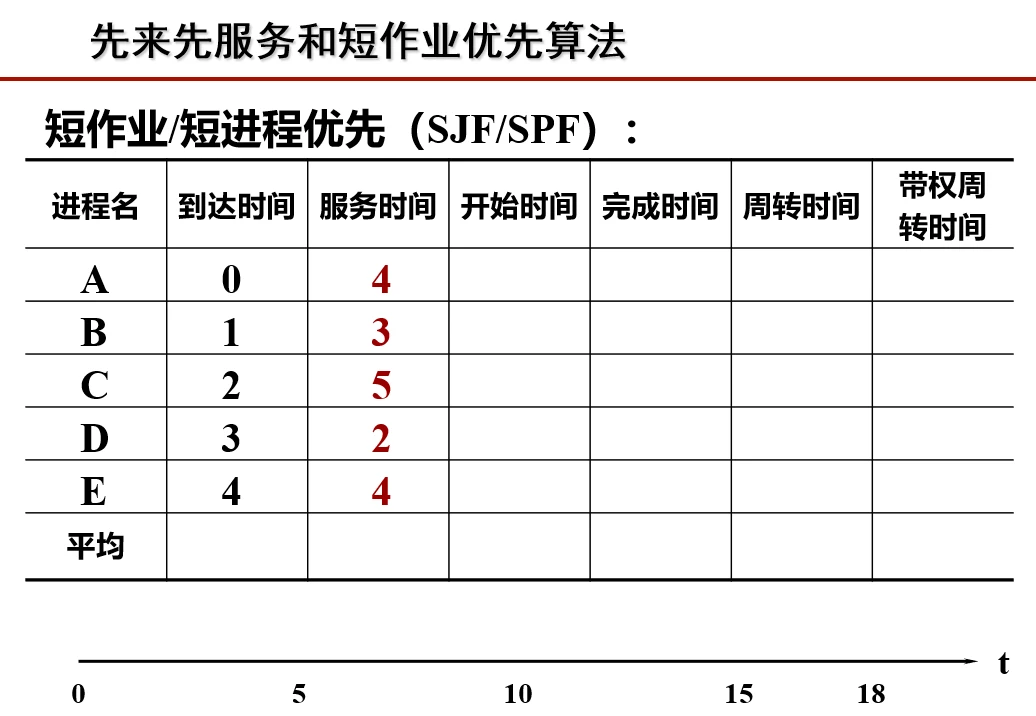
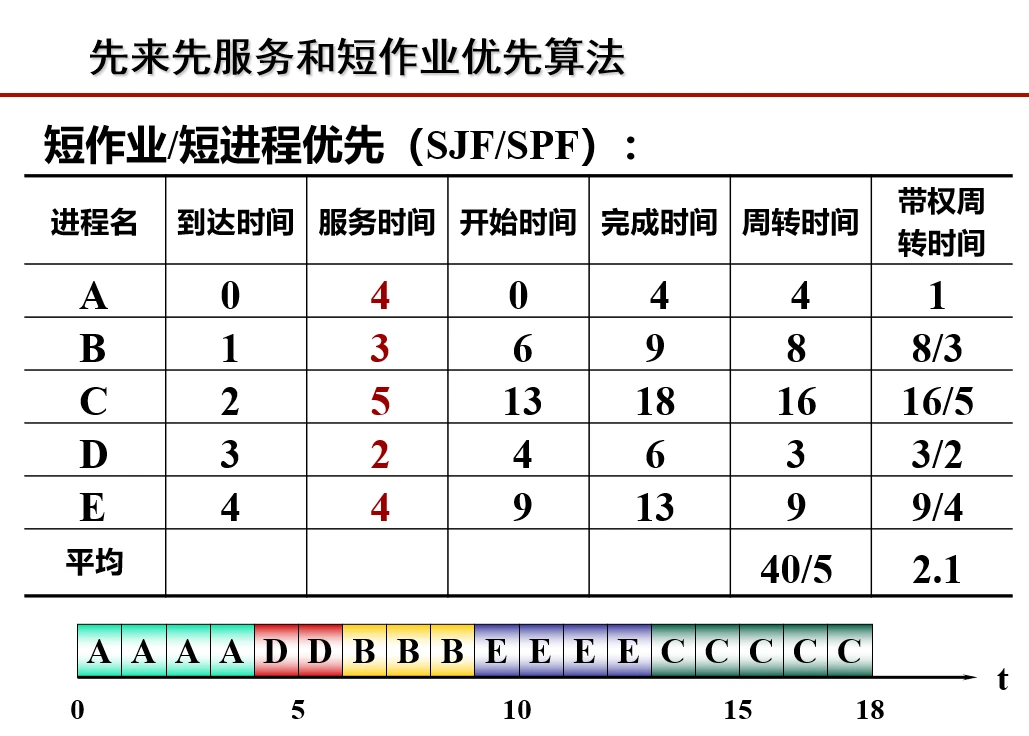
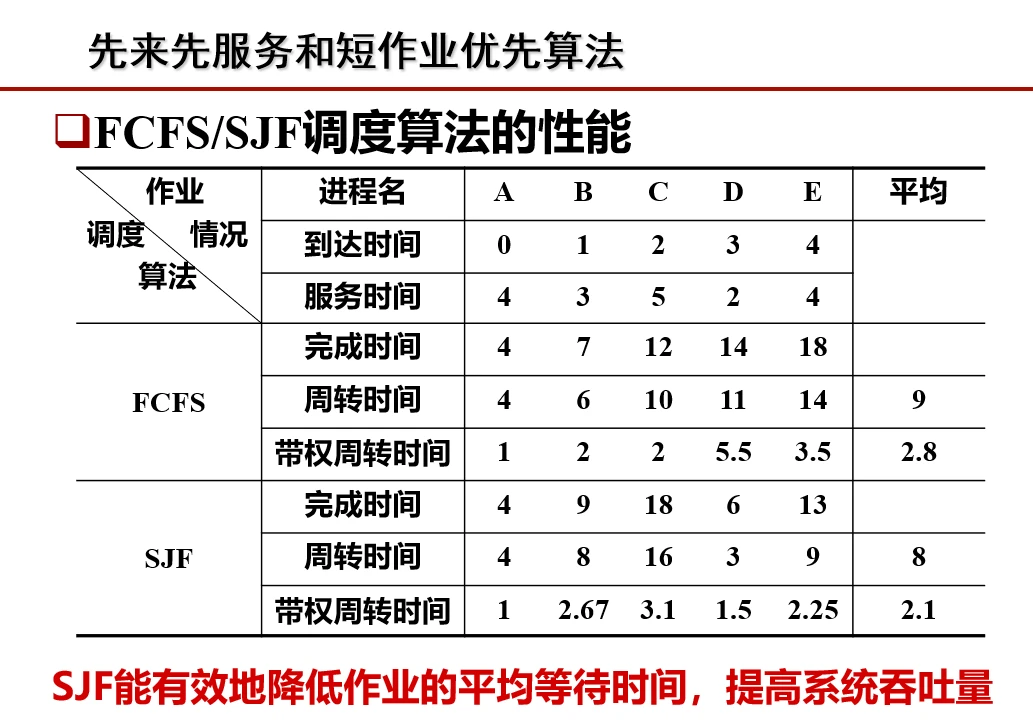
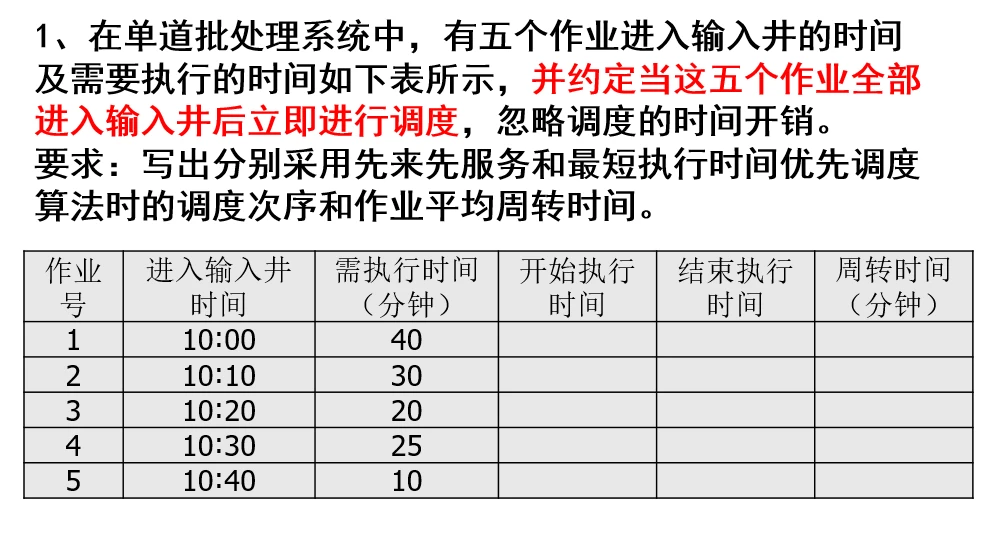
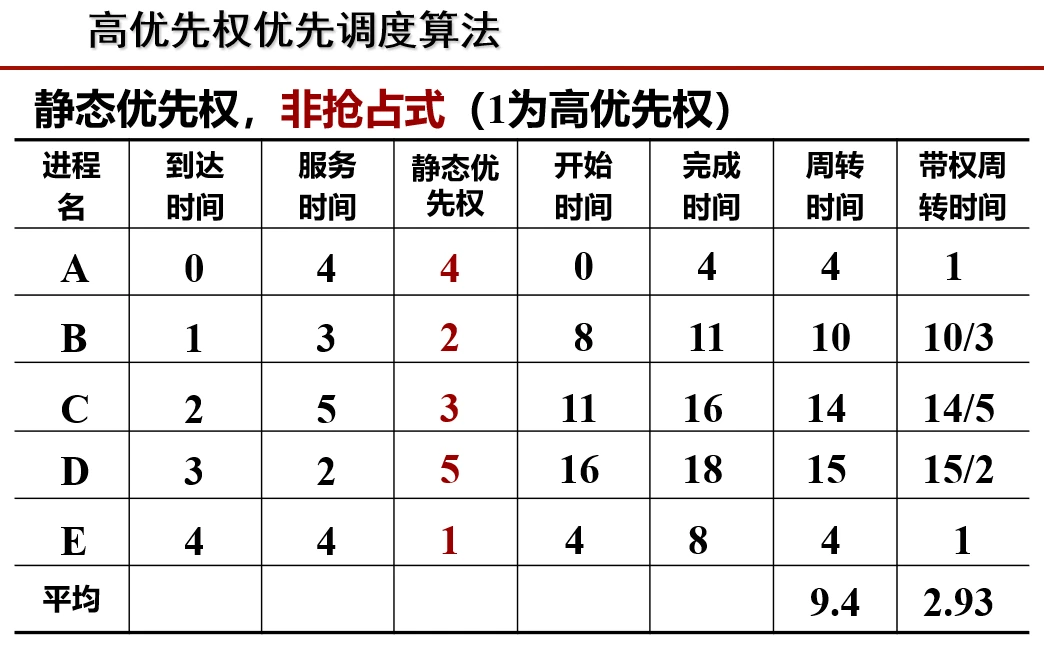
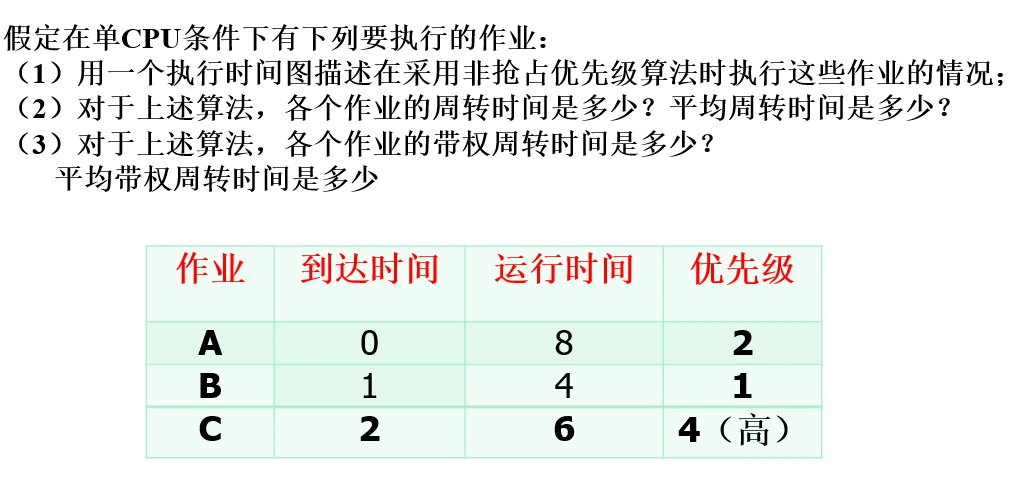
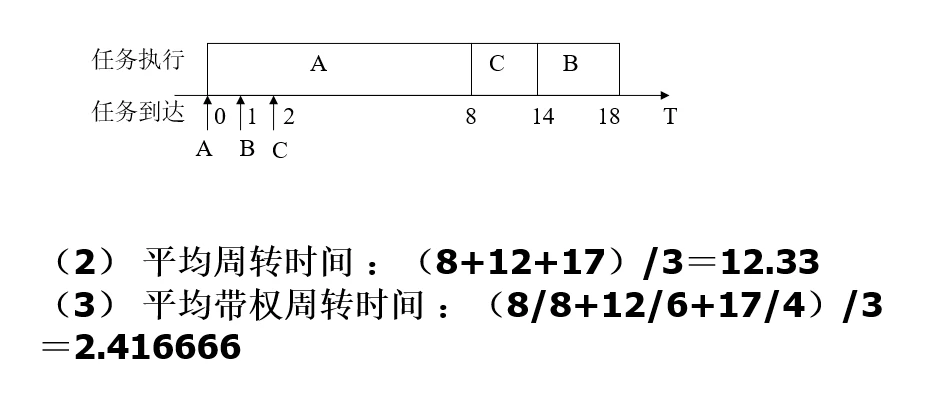
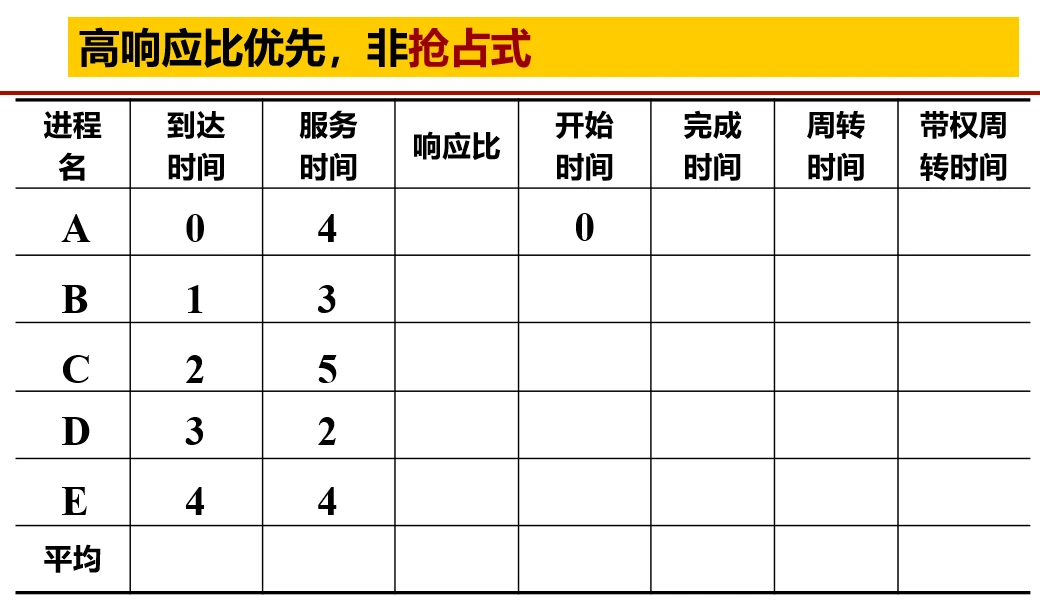
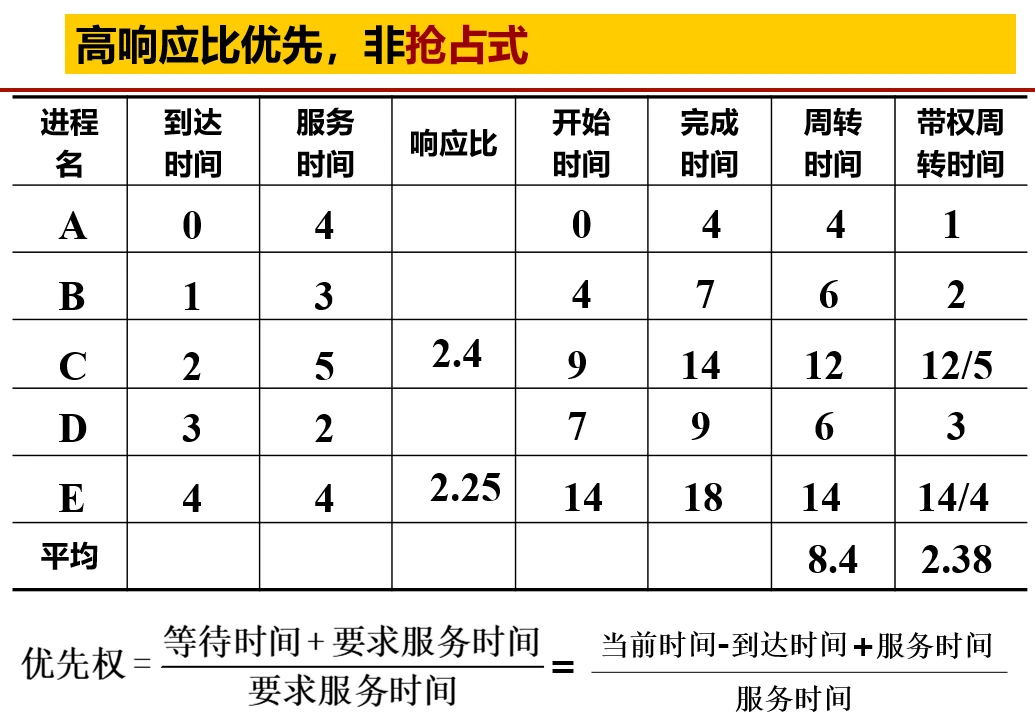
## Practice 5.01. First-Come, First-Served (FCFS) Algorithm - Turnaround time: completion time - arrival time - Average turnaround time: sum of the turnaround times of all processes / number of processes - Weighted turnaround time: turnaround time / service time - Average weighted turnaround time: sum of the weighted turnaround times of all processes / number of processes2. Shortest Job First (SJF) Algorithm - Selection rule: select the job (process) that has already arrived and has the shortest service time to execute - Turnaround time: completion time - arrival time - Average turnaround time: sum of the turnaround times of all processes / number of processes - Weighted turnaround time: turnaround time / service time - Average weighted turnaround time: sum of the weighted turnaround times of all processes / number of processes## Practice 6.0## Practice 7.0---## Practice 8.0## Practice 9.0## Practice 10## Practice 11Priority should be calculated according to the response ratio,the formula is: (current time - arrival time + service time) / service time## Practice 12## 6. Deadlock### Definition of DeadlockDefinition: multiple processes fall into a state of waiting for each other because they compete with each other for resources, causing these processes to be unable to execute or release resources, forming a deadlockNecessary conditions for its occurrence:Mutual exclusion condition: at least one resource cannot be shared, that is, only one process can use it at a time (used exclusively) Hold and wait (request and hold condition): a process already holds some resources and is requesting other resources, but these resources are already held by other processes No preemption: allocated resources cannot be preempted; they can only be released by the process itself Circular wait: there is a cycle in which each process waits for the resources held by another process, forming a loopMethods for handling deadlock: Deadlock prevention: avoid it by breaking one of the necessary conditions Deadlock avoidance: dynamically allocate resources to ensure the system is always in a safe state, e.g., the banker’s algorithm Deadlock detection and recovery: monitor the system’s resource allocation, detect deadlocks and take measures, e.g., terminating processes, rolling back operations Deadlock ignorance: in some cases, the probability of deadlock is very small, so no handling is needed and it is left to the user to resolveSafe stateConcept: it means that the system can, according to some process order (P1, P2, …, Pn), allocate the required resources to each process Pn until the maximum demand of each process for resources is satisfied, enabling every process to complete successfully. If the system cannot find such a safe sequence, the system is said to be in an unsafe state.# Formulas### I. Process Scheduling Algorithms1. First-Come, First-Served (FCFS) Algorithm - Turnaround time: completion time - arrival time - Average turnaround time: sum of the turnaround times of all processes / number of processes - Weighted turnaround time: turnaround time / service time - Average weighted turnaround time: sum of the weighted turnaround times of all processes / number of processes2. Shortest Job First (SJF) Algorithm - Selection rule: select the job (process) that has already arrived and has the shortest service time to execute - Turnaround time: completion time - arrival time - Average turnaround time: sum of the turnaround times of all processes / number of processes - Weighted turnaround time: turnaround time / service time - Average weighted turnaround time: sum of the weighted turnaround times of all processes / number of processes3. Highest Response Ratio Next (HRRN) Algorithm - Waiting time: current start time of the system - process arrival time - Response ratio: (waiting time + required service time) / required service time - Selection rule: select the job (process) with the highest response ratio each time to execute - Turnaround time: completion time - arrival time - Average turnaround time: sum of the turnaround times of all processes / number of processes - Weighted turnaround time: turnaround time / service time - Average weighted turnaround time: sum of the weighted turnaround times of all processes / number of processes4. Round Robin (RR) Algorithm - Turnaround time: completion time - arrival time - Average turnaround time: sum of the turnaround times of all processes / number of processes - Weighted turnaround time: turnaround time / service time - Average weighted turnaround time: sum of the weighted turnaround times of all processes / number of processes - Execution rule: each process is allocated a time slice and executes in turn; after the time slice is used up, regardless of whether it has finished, the system switches to the next process### II. Page Replacement Algorithms1. Optimal (OPT) Replacement Algorithm - Predict the future usage of pages, so as to select the page that will not be used for the longest time in the future for replacement. - Number of page faults: count the number of times the required page is not in memory and needs to be loaded from external memory - Page fault rate: number of page faults / length of the page reference sequence - Replacement rule: select the page that will not be accessed for the longest time in the future for replacement (difficult to implement in practice; used for theoretical comparison)2. First-In, First-Out (FIFO) Algorithm - It means the page that enters memory first is replaced out first. - Number of page faults: count the number of times the required page is not in memory and needs to be loaded from external memory - Page fault rate: number of page faults / length of the page reference sequence - Replacement rule: select the page that entered memory first for replacement3. Least Recently Used (LRU) Algorithm - Eliminate the page that has been least recently used. - Number of page faults: count the number of times the required page is not in memory and needs to be loaded from external memory - Page fault rate: number of page faults / length of the page reference sequence - Replacement rule: select the page that has not been used for the longest time for replacement### III. Disk Scheduling Algorithms1. First-Come, First-Served (FCFS) Algorithm - Seek time: the time required for the head to move to the specified track, calculated based on the number of tracks the head moves - Total seek time: the sum of all seek times - Average seek length: total seek length / number of disk requests - Processing rule: process in sequence according to the arrival order of disk requests2. Shortest Seek Time First (SSTF) Algorithm - Seek time: the time required for the head to move to the specified track, calculated based on the number of tracks the head moves - Total seek time: the sum of all seek times - Average seek length: total seek length / number of disk requests - Processing rule: select the track request closest to the current head position for processing3. SCAN Algorithm (Elevator Algorithm) - Seek time: the time required for the head to move to the specified track, calculated based on the number of tracks the head moves - Total seek time: the sum of all seek times - Average seek length: total seek length / number of disk requests - Processing rule: the head moves in one direction, processing the disk requests along the way, until it reaches one end, then changes direction and continues processing4. Circular SCAN (CSCAN) Algorithm - Seek time: the time required for the head to move to the specified track, calculated based on the number of tracks the head moves - Total seek time: the sum of all seek times - Average seek length: total seek length / number of disk requests - Processing rule: the head moves in one direction, processing the disk requests along the way; after reaching one end, it immediately returns to the starting end, and then processes in the same direction again### IV. Cache Related1. Cache hit rate calculation: number of cache hits / total number of accesses2. Average access time: hit rate × cache access time + (1 - hit rate) × main memory access time### V. Virtual Memory Related (Using Paging as an Example)1. Maximum number of pages for a user job: size of the virtual address space / page size2. Number of blocks into which main memory space is divided: main memory capacity / page size3. Page number: INT (logical address / page size)4. Offset within a page: logical address MOD page size5. Physical address: block number × page size + offset within the page6. Offset within a page: logical address MOD page sizeplain
1.2.1 Functions
As a manager, an operating system includes: processor management, memory management, file management, and device management.
Processor management: In a multiprogramming environment, both allocation and execution are based on the process as the basic unit, so processor management can be summarized as process management, which includes: process control, process synchronization, process communication, deadlock handling, processor scheduling, etc.
Memory management: It provides an environment that makes it convenient for users to use memory and improves memory utilization, including functions such as memory allocation and reclamation, address mapping, memory protection and sharing, and memory expansion.
File management: Also called the file system, it includes: storage space management, directory management, file read/write management and protection, etc.
Device management: It mainly fulfills users’ I/O requests, enables users to use various devices, and improves device utilization, including functions such as buffer management, device allocation, device handling, and virtual devices.
1.2.2 Interfaces
Command interface
Online command interface: Also called the interactive command interface; an interface suitable for time-sharing or real-time systems
Offline command interface: Also called the batch command interface; suitable for batch processing systems, it consists of a set of job control commands.
Program interface
Graphical interface: GUI (it is not part of the operating system; rather, the interfaces it calls are)
Benefits: improves CPU utilization, increases memory and I/O device utilization, and increases system throughput
Drawback: long average turnaround time and no interactive capability
1.3.3 Time-Sharing System
Concept: A system formed by connecting multiple terminals, each equipped with a display and keyboard, to a single host. The system allows multiple users to use the computer interactively through their own terminals at the same time, sharing the resources of the host.
Drawback: it cannot guarantee timely processing within a specific time
1.3.4 Real-Time System
Hard real-time: a certain action must absolutely be completed within the specified time
Soft real-time: it may occasionally violate the time requirement, but it will not cause any permanent harm or damage
Characteristics: timeliness and reliability
1.4 Operating Environment of the Operating System
1.4.1 User Mode and Kernel Mode
The CPU executes two kinds of programs of different natures: one is the system kernel program, and the other is the application program
The operating system distinguishes user mode and kernel mode, strictly separating the two kinds of programs: user-written programs run in user mode, while the operating system’s kernel programs run in kernel mode
User mode: command interpreter
Kernel mode: process scheduler, clock interrupt handler, page fault handler
[!lol] Fun Facts
System calls are issued in user mode; the called program executes in kernel mode
External interrupts occur in user mode, but their handling executes in kernel mode
Page faults occur in user mode, and their handling executes in kernel mode
The page fault handler executes in kernel mode
1.4.2 The Kernel
Concept: The kernel is the lowest-level software of a computer and an extension of the computer’s functions; it mostly includes four aspects
1.4.2.1 Clock
Clock management: timers. Through clock management, the operating system needs to provide users with accurate time; through the management of clock interrupts, it can implement process switching.
1.4.2.2 Interrupts
Interrupt mechanism: the original purpose of introducing it was to improve CPU utilization in a multiprogramming environment
(For example, a data transfer request from an external device, a hardware fault, or a timer expiring, etc.) the CPU pauses the program currently being executed and instead executes a program that handles that special event (called the interrupt service routine)
External interrupts (interrupts)
They originate from outside the CPU and are related to the currently executing instruction
Data structures controlled by the system and their handling: e.g., an interrupt signal is issued when an I/O operation completes
Data structures controlled by the system and their handling: e.g., a user forcibly terminates a process
Internal interrupts (exceptions)
They originate from inside the CPU and are related to the currently executing instruction
Voluntary interrupt — instruction interrupt
e.g., using the supervisor call instruction (also called the trap instruction, the Trap instruction) during a system call
Forced interrupt
Mainly: hardware faults (e.g., page faults) or software interrupts (e.g., integer division by 0)
The occurrence of an interrupt means the operating system needs to intervene
Switching from user mode to kernel mode is implemented through interrupts, and interrupts are also the only way to do so
Switching from kernel mode to user mode is done by executing some privileged instructions to set the flag bits of the Program Status Word (PSW) to user mode
1.4.2.3 Primitives
Primitives: some low-level small common programs that can be called; each of them completes a specified operation and is indivisible.
The lowest level
Atomicity: Considering the system’s security and ease of management, the operation is completed in one go
Short execution time
Called relatively frequently
The way to define a primitive is to disable interrupts, so that all other actions are completed indivisibly, and then enable interrupts again
1.4.2.4 Data Structures Controlled by the System and Their Handling
2. Description and Control of Processes
2.1 The Concept of a Process
2.1.1 Definition
From different perspectives, a process can have different definitions; some classic ones are:
A process is an execution of a program
A process is the activity that occurs when a program and its data are executed sequentially on a processor
A process is a program with independent functions that runs on a data set; it is an independent unit for the system to allocate resources and perform scheduling.
2.1.2 Composition
A process is composed of the Process Control Block (PCB), a program segment, and a data segment
The operating system manages processes through the PCB, so the PCB should contain all kinds of information the operating system needs to manage their execution, such as: process description information, process control and management information, a resource allocation list, and processor-related information. (For example, process state and priority information belong to the process description information)
Program segment: the location where the program code is stored
Data segment: the operation data used and generated when the program runs. For example, global variables, local variables, and constants defined by macros are stored in the data segment.
A process can also be called: a process entity
2.1.3 Organization
Linked-list approach
PCBs are divided into multiple queues according to process state, and the operating system holds pointers to each queue
Ready queue
Running queue
Blocked queue
Index approach
Based on the different states of processes, several index tables are built, and the operating system holds pointers to each index table
Ready queue
Running queue
Blocked queue
2.1.4 Characteristics
Dynamism: The most basic characteristic; a process is an execution process of a program and occurs dynamically
Concurrency: Multiple process entities in memory; each process can execute concurrently
Independence: The basic unit that can run independently, obtain resources independently, and be independently scheduled
Asynchronism: Each process advances independently at an unpredictable speed; the operating system provides a process synchronization mechanism to solve the asynchronism problem
Structuredness: Each process is equipped with a PCB; structurally, a process consists of a program segment, a data segment, and a PCB
[!lol] Interesting
A process is dynamic
A program is static and does not possess the characteristics of a process: dynamic, concurrent, independent, asynchronous, and structural.
A program is reproducible (reproducibility: whether it runs from start to finish or starts and stops, it will obtain the same result)
A program is closed (it runs in a closed environment and exclusively occupies the system’s resources; apart from its initial state, once it begins execution it is not affected by the outside world and can only change when it changes itself)
2.2 States and Transitions
2.2.1 Definition
Definition: The lifecycle of a process can be divided into a set of states, and these states characterize the entire process. Process states reflect the life state of a process.
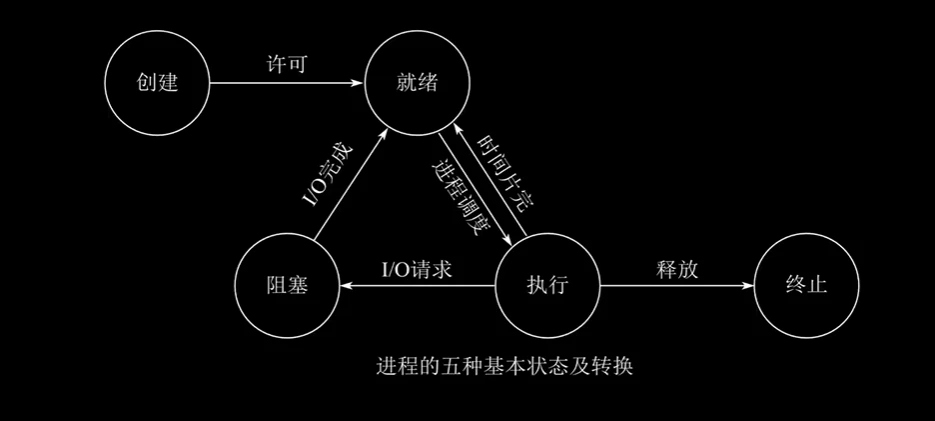
2.2.2 The Five States
New state: When creating a process, it needs to request a blank PCB, fill it with information for controlling and managing the process, and complete resource allocation. If the creation cannot be completed — for example, resources cannot be satisfied and it cannot be scheduled to run — the state the process is in at this time is called the new state.
Running state: The process occupies the CPU’s resources and runs on the CPU
With a single core, only one process is in the running state
With dual cores, two processes can be in the running state
Ready state: The process already has the conditions to run, but the CPU is busy and has not yet been allocated to it
Blocked state: Also called the waiting state; it is waiting for something to happen and is temporarily unable to run
When that event is completed, it returns to the ready state and waits for the CPU’s service
Terminated state: Also called the withdrawn state; when a process ends, an error occurs, or the system is terminated, it enters the terminated state and can no longer execute
The process of withdrawing is not completed in an instant; the operating system needs to reclaim the memory resources that were used at creation time
Transitions Between States
Running (running state) -> Ready
(When entering the ready state, the process has already obtained all needed resources except the processor)
The process occupies the CPU for too long; the CPU has limited resources to allocate
It is preempted of CPU resources by preemptive priority
Ready -> Running
The process’s time slice is used up, and it is scheduled to the ready queue; a process is allocated from the queue to the CPU
Running -> Blocked
The executing process waits for some event and cannot execute, e.g., its turn for a resource has not come yet
Blocked -> Ready
The event the process was waiting for has occurred
Blocked -> Running is irreversible
Ready -> Blocked is irreversible
For example: after a process’s disk read ends (while it is blocked), the OS changes the process’s state to ready instead of directly executing it
Applying for system resources through system calls, or applying to wait for a resource to be produced (for example, a resource has not been released and one waits for some running result), this is an I/O request.
2.3 Process Communication
2.3.1 Concept
Concept: it refers to the exchange of information between processes
pv operations are the lowest-level communication; high-level communication refers to ways of transmitting large amounts of data with high efficiency.
2.3.2 Three Main Types of High-Level Communication
Shared memory: a communication method based on shared data structures, e.g., producer-consumer. Next is the shared memory region-based communication method, which is a high-level communication method.
For example: Process A and Process B cannot directly access each other’s process space
So we need to use shared space to let the two processes access each other, but this method is mutually exclusive: when Process A accesses B’s process space, B cannot access A
For example: if the shared data structure can only hold an array of length 10, then each communication can only transmit one array of length 10, and if the data format is restricted, the transmission speed will be greatly reduced
Shared data structures are a somewhat low-level communication method
The shared memory region method, on the other hand, does not restrict length, format, location, etc., greatly improving transmission speed and transmission freedom; it is a high-level communication method
Message passing: using formatted messages as the unit and transmitting messages with primitives; it is divided into direct communication and indirect communication. There are two kinds of primitives:
One is the send primitive
One is the receive primitive
A formatted message, for example: a sent message is divided into a message header and a message body
Direct communication attaches the message directly to the tail of a buffer queue, and then the process takes the messages from the head one by one using the receive primitive
Indirect communication, in contrast, first sends to an intermediate entity (also called a mailbox); when a message needs to be delivered, it is taken directly from the mailbox and identified by the message header to avoid transmission errors
Pipe communication: a special way of passing information; it connects a reader process and a writer process to achieve file sharing between them, also called a “pipe” file
Simply put: a pipe is established between two processes, but a single pipe is half-duplex — it can send back and forth, but transmission can only occur in one direction at a time
Full duplex establishes another pipe, one for reading and one for writing, but their transfers are also mutually exclusive. For example: only after Process A finishes writing can Process B perform reading.
2.3 Threads
2.3.1 Introduction
To simplify communication between processes and increase the degree of process concurrency with minimal overhead
It is the smallest unit of execution in a process, an entity of the process, and the basic unit independently scheduled and dispatched by the system
A thread does not own its own system resources; it only owns a little bit of resources essential for running, but it can share all the resources owned by the process with other threads belonging to the same process
A thread can create and withdraw another thread, and multiple threads in the same process can execute concurrently
2.3.2 Concept
Concept: it is the basic unit of scheduling and dispatching
A thread represents a control point of the process and can execute a series of instructions
Decomposing a process into threads also allows effective use of multiprocessor and multicore computers
2.3.3 Comparison of Threads and Processes
2.3.3.1 Differences Between Processes and Threads
Scheduling: threads are the basic unit of scheduling and allocation, while processes are the basic unit that owns resources
Concurrency: processes can execute concurrently, and multiple threads of the same process can too
Resource ownership: a process is an independent unit that owns resources; a thread does not own system resources but can access the resources belonging to its process
System overhead: when creating or withdrawing a process, the system must allocate and reclaim resources for it, so the system overhead is clearly greater than the overhead of creating a thread
2.3.3.2 The Relationship Between Processes and Threads
A thread belongs to only one process; a process has multiple threads, at least one
Resources are allocated to processes, and threads of the same process can share all the resources of that process
The processor is allocated to threads, i.e., what actually runs on the processor is the thread
During execution, threads need to cooperate and synchronize. Threads of different processes need to use message communication to achieve synchronization. A thread is an execution unit within a process and also a schedulable entity within the process
3. Processor Scheduling
3.1 Basic Concepts of Processor Scheduling
Basic criteria: different scheduling algorithms have different characteristics, and these characteristics must be considered when choosing a scheduling algorithm. To systematically compare the performance of processor scheduling algorithms, many evaluation criteria have been proposed.
CPU utilization
The CPU is one of the most important and expensive resources of a computer, so it should be fully used by keeping the CPU “busy” to improve resource utilization
System throughput
Represents the number of jobs the CPU completes per unit of time
Turnaround time
Turnaround time refers to the time elapsed from when a job is submitted to when it is completed; it is the sum of the time the job waits, queues in the ready queue, runs on the processor, and performs input/output operations.
Job turnaround time: turnaround time = job completion time - job submission time
Average turnaround time: average turnaround time = the sum of the turnaround times of n jobs / n
Average weighted turnaround time: the average of the weighted turnaround times of multiple jobs, equal to the sum of n weighted turnaround times / n
Waiting time
Refers to the sum of the time a process is in the state of waiting for the processor; the longer the waiting time, the lower the user satisfaction rate
Response time
Refers to the time from when a user submits a request to when the system first produces a response. In interactive systems, turnaround time cannot be the best evaluation criterion; response time is generally used as one of the main criteria for measuring scheduling algorithms.
Three levels
Job scheduling (high-level scheduling)
Its main task is to select one or more jobs from those in the backup state on external storage according to certain principles, allocate necessary resources such as memory and input/output devices to them, and create corresponding processes so that they gain the right to compete for the processor
This is the process of bringing jobs in
Medium-level scheduling
Memory scheduling; its role is to improve memory utilization and system throughput
This is the process of swapping back, and it occurs more frequently than high-level scheduling
Process scheduling (low-level scheduling)
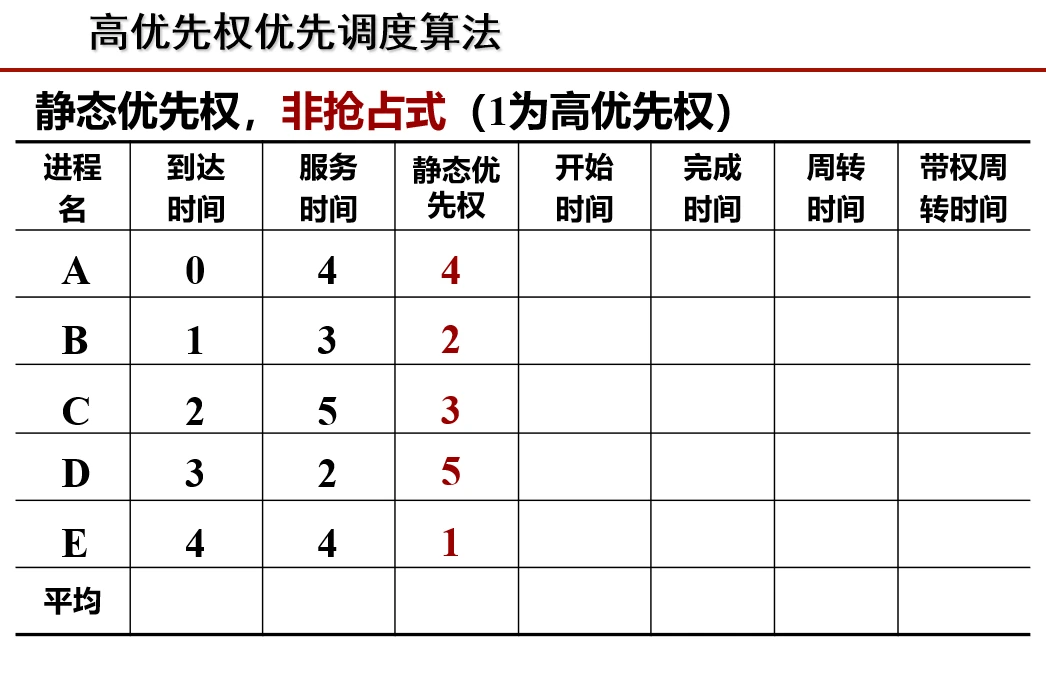
Selects a process from the ready queue according to some method and policy and allocates the processor to it
Process scheduling modes
When a process is executing on the processor, if some important or urgent process needs to be handled — that is, a higher-priority process enters the ready state — then we need to consider how to allocate the processor
Non-preemptive (non-preempting) scheduling
A process is running on the processor; even if a more urgent or higher-priority process enters the ready state, the processor is not given up immediately, but instead the current process is allowed to finish
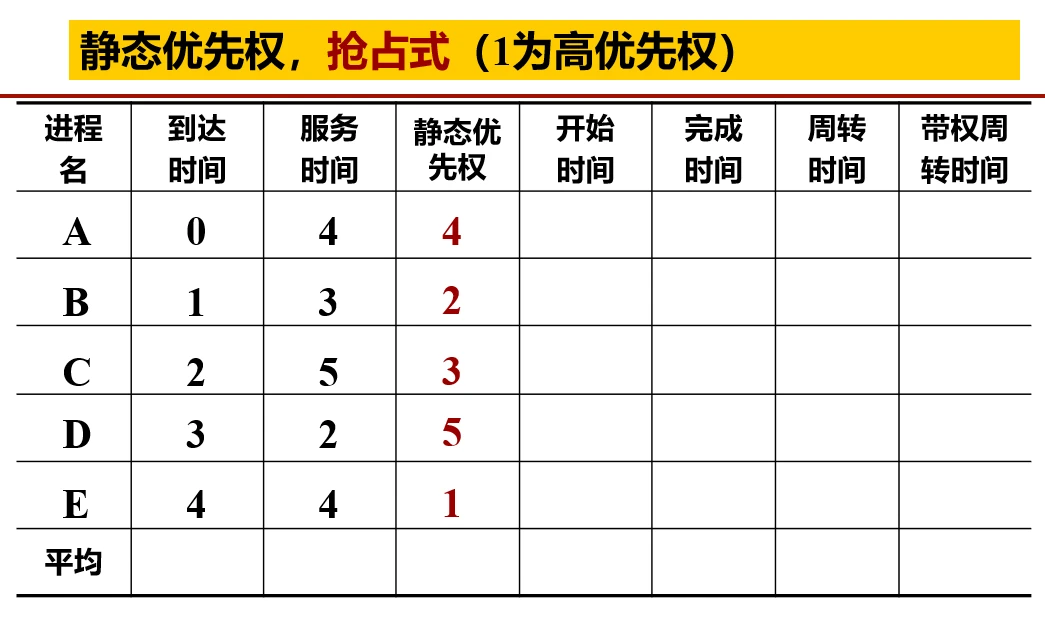
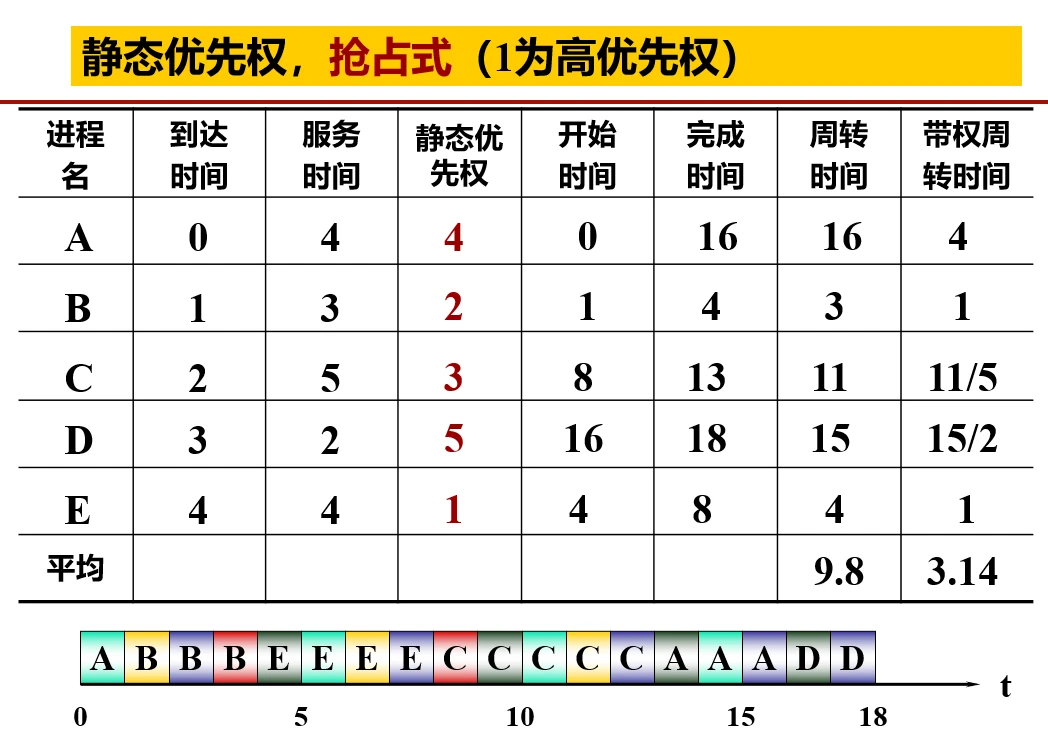
Preemptive (preempting) scheduling
A process is running on the processor; when a high-priority or urgent process enters the ready state, the processor is given up immediately to seize the current resources, even from the process currently executing
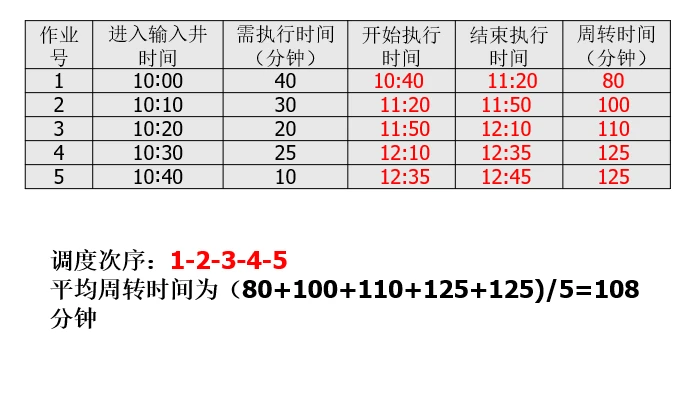
3.2 First-Come, First-Served Algorithm
“First come first served” is: FCFS
Scheduling is performed in the order in which jobs/processes arrive.
Drawback: it favors long jobs; the opposite for short jobs
Advantage: simple to implement
Suitable for job scheduling and process scheduling
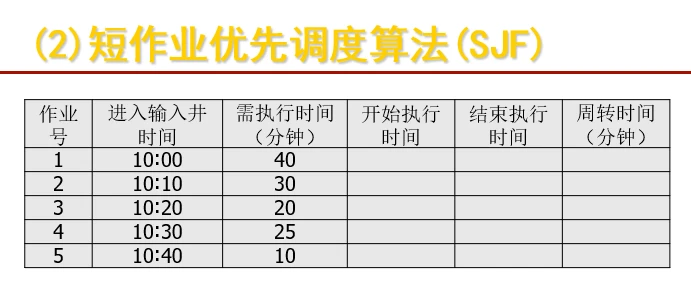
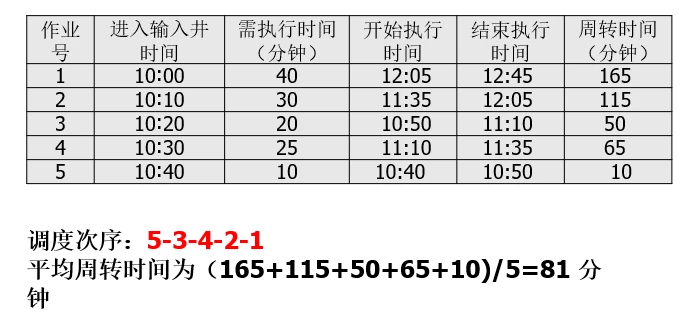
3.3 Shortest Job First
“Short job first” is: SJF
Priority is calculated based on the length of the job; the shorter the job, the higher its priority
Suitable for job scheduling and process scheduling
Advantage: shortest average waiting time and average turnaround time
Drawback: the job’s running time must be known in advance; it is unfavorable to long jobs, starvation can occur, and the urgency of jobs is not considered


If you enjoyed this, leave a comment~