本章记录本博客对于Shoka主题的美化魔改之加载动画修改
# 加载动画
# 概要
shoka主题自带的旋转猫🐱,感觉不好看,所以我们换一个加载动画
# 加载动画修改步骤
# 修改NJK
- 打开主题根目录:
themes\shoka\layout\_partials\ - 打开
layout.njk文件 - 页面查找
Ctrl+F找loading,动画部分是<div id=loading>
  <div id="loading">
  //这个div就是我的动画,原来的是class="cat",我的是col-sm-2
    <div class="col-sm-2">
				<div id="wave1">
				</div>

			</div>
    </div>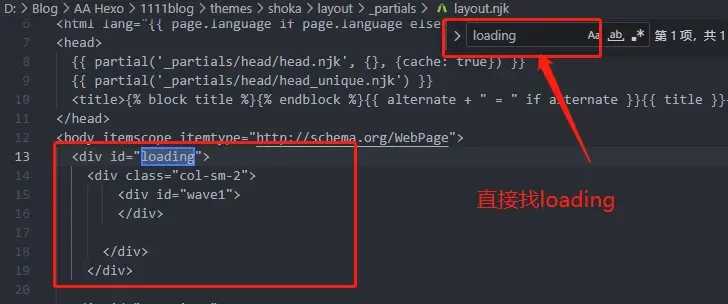
# 修改stylus
- 找到
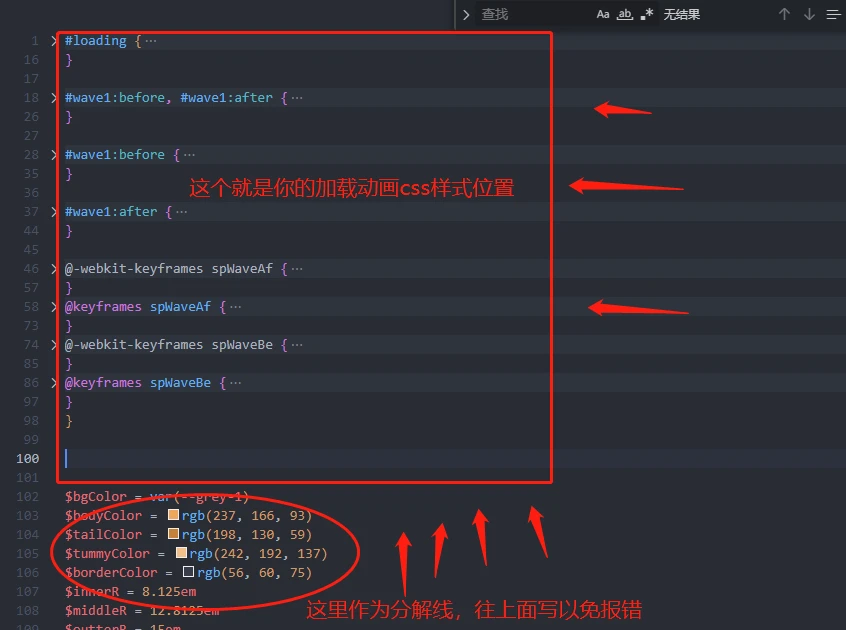
themes\shoka\source\css\_common\components\third-party\loading.styl - 修改loading中的css
- 找不到就页面查找
Ctrl+F找loading
#loading {
  @extend $fix-fullscreen;
  background-color: var(--grey-1);
  if(!hexo-config('loader.start')) {
    display: none;
  }
//这是我的样式参考,当然了你可以根据你自己的来修改
#wave1 {
  display: block;
  position: absolute;
  top: 50%;
  left: 50%;
  height: 50px;
  width: 50px;
  margin: -25px 0 0 -25px;
  border-radius: 50%;
}

#wave1:before, #wave1:after {
  content: '';
  border: 2px solid #008744;
  border-radius: 50%;
  width: 50px;
  height: 50px;
  position: absolute;
  left: 0px;
}

#wave1:before {
  -webkit-transform: scale(1, 1);
      -ms-transform: scale(1, 1);
          transform: scale(1, 1);
  opacity: 1;
  -webkit-animation: spWaveBe 0.6s infinite linear;
          animation: spWaveBe 0.6s infinite linear;
}

#wave1:after {
  -webkit-transform: scale(0, 0);
      -ms-transform: scale(0, 0);
          transform: scale(0, 0);
  opacity: 0;
  -webkit-animation: spWaveAf 0.6s infinite linear;
          animation: spWaveAf 0.6s infinite linear;
}

@-webkit-keyframes spWaveAf {
  from {
    -webkit-transform: scale(0.5, 0.5);
            transform: scale(0.5, 0.5);
    opacity: 0;
  }
  to {
    -webkit-transform: scale(1, 1);
            transform: scale(1, 1);
    opacity: 1;
  }
}
@keyframes spWaveAf {
  from {
    -webkit-transform: scale(0.5, 0.5);
            transform: scale(0.5, 0.5);
    -webkit-transform: scale(0.5, 0.5);
            transform: scale(0.5, 0.5);
    opacity: 0;
  }
  to {
    -webkit-transform: scale(1, 1);
            transform: scale(1, 1);
    -webkit-transform: scale(1, 1);
            transform: scale(1, 1);
    opacity: 1;
  }
}
@-webkit-keyframes spWaveBe {
  from {
    -webkit-transform: scale(1, 1);
            transform: scale(1, 1);
    opacity: 1;
  }
  to {
    -webkit-transform: scale(1.5, 1.5);
            transform: scale(1.5, 1.5);
    opacity: 0;
  }
}
@keyframes spWaveBe {
  from {
    -webkit-transform: scale(1, 1);
            transform: scale(1, 1);
    opacity: 1;
  }
  to {
    -webkit-transform: scale(1.5, 1.5);
            transform: scale(1.5, 1.5);
    opacity: 0;
  }
}
}
# 偏移修复
- 打开
themes\shoka\source\css\_common\outline\outline.styl - 页面查找
Ctrl+F找.cat - 按照.cat的写法在下面加上你的,比如我的是
.col-sm-2,所以写成下面这样
  .cat {
    margin-top: 10rem;
    margin-top: 20rem;
  }
//这是我的,因为我的class就是col-sm-2
  .col-sm-2 {
    margin-top: 20rem;
    margin-left: 15rem;
  }
# END
✔️大功告成,如果你配置有问题可以评论,我会帮助你