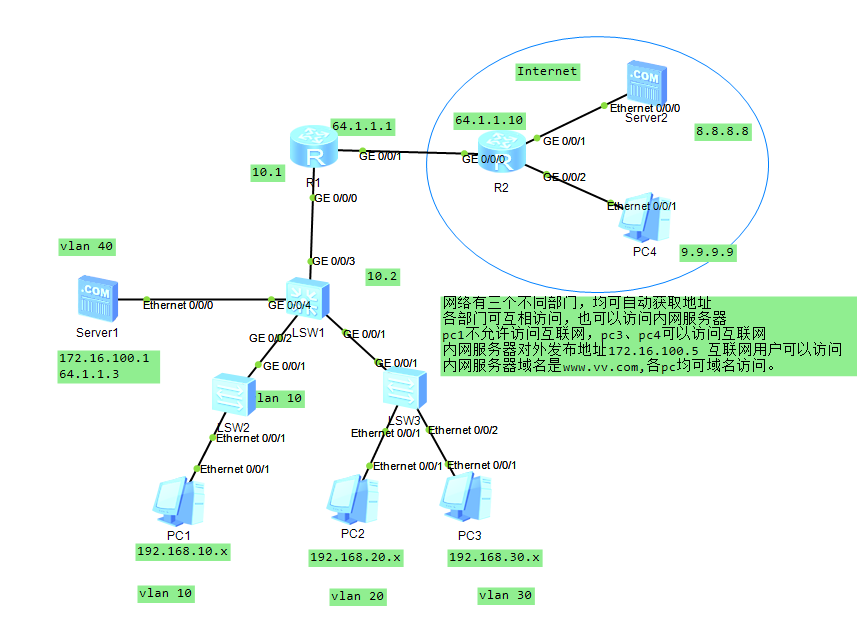
# 核心步骤
LSW1:
vlan batch 10 20 30 40 100
dhcp enable
interface Vlanif10
 ip address 192.168.10.254 255.255.255.0
 dhcp select interface
 dhcp server dns-list 172.16.100.1
interface Vlanif20
 ip address 192.168.20.254 255.255.255.0
 dhcp select interface
 dhcp server dns-list 172.16.100.1
interface Vlanif30
 ip address 192.168.30.254 255.255.255.0
 dhcp select interface
 dhcp server dns-list 172.16.100.1
interface Vlanif40
 ip address 172.16.100.254 255.255.255.0
interface Vlanif100
 ip address 10.10.10.2 255.255.255.0
interface GigabitEthernet0/0/1
 port link-type trunk
 port trunk allow-pass all
interface GigabitEthernet0/0/2
 port link-type access
 port default vlan 10
interface GigabitEthernet0/0/3
 port link-type access
 port default vlan 100
interface GigabitEthernet0/0/4
 port link-type access
 port default vlan 40
ip route-static 0.0.0.0 0.0.0.0 10.10.10.1
LSW3
undo info-center enable
vlan batch 20 30
interface Ethernet0/0/1
 port link-type access
 port default vlan 20
interface Ethernet0/0/2
 port link-type access
 port default vlan 30
interface GigabitEthernet0/0/1
 port link-type trunk
 port trunk allow-pass all
R1
nat address-group 1 64.1.1.5 64.1.1.5
acl number 2000
 rule 5 permit source 192.168.0.0 0.0.255.255
acl number 2001
 rule 5 deny source 192.168.10.0 0.0.0.255
 rule 10 permit
interface GigabitEthernet0/0/0
 ip address 10.10.10.1 255.255.255.0
 traffic-filter inbound acl 2001
interface GigabitEthernet0/0/1
 ip address 64.1.1.1 255.255.255.0
 nat outbound 2000 address-group 1
 nat server global 64.1.1.3 inside 172.16.100.1
ip route-static 0.0.0.0 0.0.0.0 64.1.1.10
ip route-static 172.16.100.0 255.255.255.0 10.10.10.2
ip route-static 192.168.0.0 255.255.0.0 10.10.10.2
R2
undo info-center enable
interface GigabitEthernet0/0/0
 ip address 64.1.1.10 255.255.255.0
interface GigabitEthernet0/0/1
 ip address 8.8.8.254 255.255.255.0
interface GigabitEthernet0/0/2
 ip address 9.9.9.254 255.255.255.0
ip route-static 172.16.100.0 255.255.255.0 64.1.1.1
ip route-static 192.168.0.0 255.255.0.0 64.1.1.1
# 结果
- 测试ping 8.8.8.8正常
- 测试各pc 域名vv.com dns解析正常
- 测试pc互通
- 测试pc1 ping 8.8.8.8 被acl拦截