

This chapter records a reference example of a network congestion management and avoidance experiment in eNSP.
Topology
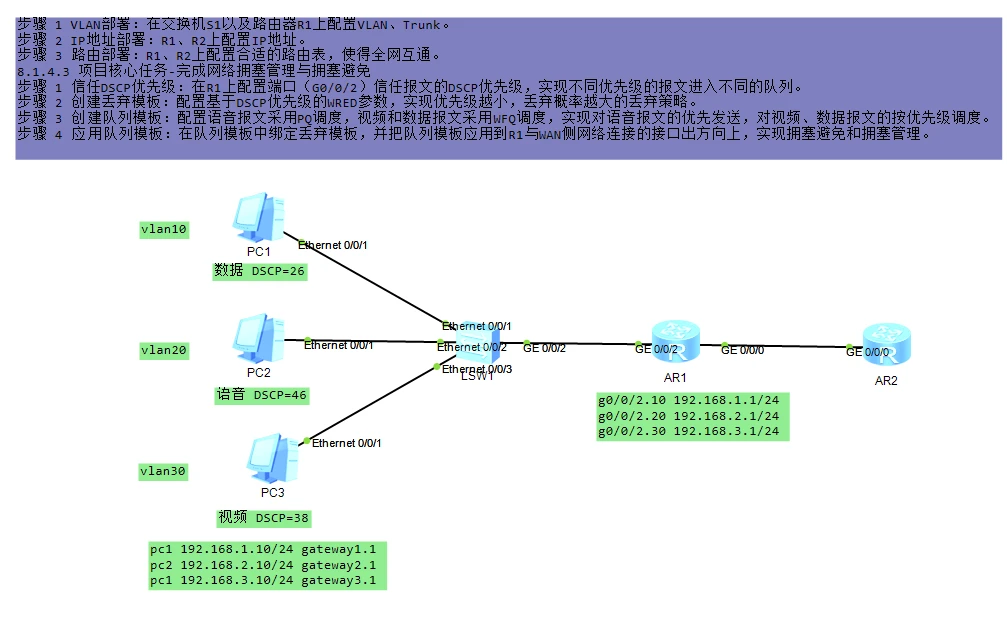
Reference Configuration
S1
[S1]vlan batch 10 20 30
[S1]interface GigabitEthernet0/0/2
[S1-GigabitEthernet0/0/2]port link-type trunk
[S1-GigabitEthernet0/0/2]port trunk allow-pass vlan 10 20 30
[S1-GigabitEthernet0/0/2]quit
[S1]interface Ethernet0/0/1
[S1-Ethernet0/0/1]port link-type access
[S1-Ethernet0/0/1]port default vlan 10
[S1-Ethernet0/0/1]quit
[S1]interface Ethernet0/0/2
[S1-Ethernet0/0/2]port link-type access
[S1-Ethernet0/0/2]port default vlan 20
[S1-Ethernet0/0/2]quit
[S1]interface Ethernet0/0/3
[S1-Ethernet0/0/3]port link-type access
[S1-Ethernet0/0/3]port default vlan 30
[S1-Ethernet0/0/3]quit

[S1]traffic classifier data
[S1-classifier-c1]if-match vlan-id 10
[S1-classifier-c1]quit
[S1]traffic classifier voice
[S1-classifier-c2]if-match vlan-id 20
[S1-classifier-c2]quit
[S1]traffic classifier video
[S1-classifier-c3]if-match vlan-id 30
[S1-classifier-c3]quit

[S1]traffic behavior data
[S1-behavior-b1]remark DSCP 26
[S1-behavior-b1]quit
[S1]traffic behavior voice
[S1-behavior-b2]remark DSCP 46
[S1-behavior-b2]quit
[S1]traffic behavior video
[S1-behavior-b3]remark DSCP 38
[S1-behavior-b3]quit
[S1]traffic policy p1
[S1-trafficpolicy-p1]classifier data behavior data
[S1-trafficpolicy-p1]classifier voice behavior voice
[S1-trafficpolicy-p1]classifier video behavior video
[S1-trafficpolicy-p1]quit

[S1]interface ethernet 0/0/1
[S1-Ethernet0/0/1]traffic-policy p1 inbound
[S1-Ethernet0/0/1]quit
[S1]interface ethernet 0/0/2
[S1-Ethernet0/0/2]traffic-policy p1 inbound
[S1-Ethernet0/0/2]quit
[S1]interface ethernet 0/0/3
[S1-Ethernet0/0/3]traffic-policy p1 inbound
[S1-Ethernet0/0/3]quit
R1
vlan batch 10 20 30
[R1]interface GigabitEthernet0/0/2.10
[R1-GigabitEthernet0/0/0.10]dot1q termination vid 10
[R1-GigabitEthernet0/0/0.10]ip address 192.168.1.1 24
[R1-GigabitEthernet0/0/0.10]arp broadcast enable
[R1-GigabitEthernet0/0/0.10]quit
[R1]interface GigabitEthernet0/0/2.20
[R1-GigabitEthernet0/0/0.20]dot1q termination vid 20
[R1-GigabitEthernet0/0/0.20]ip address 192.168.2.1 24
[R1-GigabitEthernet0/0/0.20]arp broadcast enable
[R1-GigabitEthernet0/0/0.20]quit
[R1]interface GigabitEthernet0/0/2.30
[R1-GigabitEthernet0/0/0.30]dot1q termination vid 30
[R1-GigabitEthernet0/0/0.30]ip address 192.168.3.1 24
[R1-GigabitEthernet0/0/0.30]arp broadcast enable
[R1-GigabitEthernet0/0/0.30]quit
[R1]interface gigabitethernet 0/0/0
[R1-GigabitEthernet0/0/0]ip address 192.168.4.1 24
[R1-GigabitEthernet0/0/0]quit

[R2]interface gigabitethernet 0/0/0
[R2-GigabitEthernet0/0/0]ip address 192.168.4.2 24
[R2-GigabitEthernet0/0/0]quit

ip route-static 0.0.0.0 0.0.0.0 192.168.4.2

[R1]interface gigabitethernet 0/0/2
[R1-gigabitethernet 0/0/2]trust dscp   //Use the DSCP priority to allocate queues
[R1-gigabitethernet 0/0/2]quit

[R1]drop-profile data
[R1-drop-profile-data]wred dscp
[R1-drop-profile-data]dscp 26 low-limit 50 high-limit 70 discard-percentage 30
[R1-drop-profile-data]quit
[R1]drop-profile video
[R1-drop-profile-video]wred dscp
[R1-drop-profile-video]dscp 38 low-limit 60 high-limit 80 discard-percentage 20
[R1-drop-profile-video]quit

[R1]qos queue-profile queue-profile1
[R1-qos-queue-profile-queue-profile1]schedule pq 5 wfq 3 to 4
[R1-qos-queue-profile-queue-profile1]queue 4 drop-profile video
[R1-qos-queue-profile-queue-profile1]queue 3 drop-profile data
[R1-qos-queue-profile-queue-profile1]quit

[R1]interface gigabitethernet 0/0/0
[R1-GigabitEthernet0/0/0]qos queue-profile queue-profile1
[R1-GigabitEthernet0/0/0]quit
R2
[R2]ip route-static 192.168.1.0 255.255.255.0 192.168.4.1
[R2]ip route-static 192.168.2.0 255.255.255.0 192.168.4.1
[R2]ip route-static 192.168.3.0 255.255.255.0 192.168.4.1
Knowledge Points
dot1q termination vid 10
dot1q is the 802.1q protocol; dot1q literally means "dot 1q".
The meaning of dot1q termination vid 10 is: when the sub-interface receives a packet carrying vlan tag 10, it strips the tag and performs Layer 3 forwarding; when the sub-interface sends a packet, it adds the corresponding vlan tag 10 of the sub-interface to the packet.
Sub-interfaces under different main interfaces can be associated with the same VLAN ID, but different sub-interfaces under the same main interface must not be associated with the same VLAN ID.
arp broadcast enable
Enable the sub-interface's ARP broadcast function on the configured interface.
Turning this feature on or off causes the routing state of the sub-interface to go through a Down-then-Up change once, which may cause a single route flap across the entire network, affecting ongoing services.
Policy routing MQC modular QoS commands
[R1]traffic classifier data //定义流分类为名字data
[R1-classifier-class01]if-match vlan-id 10 //匹配vlanID 10
[R1]traffic behavior data //定义流行为名字为data
[R1-behavior-heha01]redirect DSCP 26 //重新标记IP报文的DSCP优先级
[R1]traffic policy policy01 //定义流量策略名字为policy01
[R1-trafficpolicy-policy01]classifier data behavior data 绑定流分类+流行为(把符合条件的流抓取出来然后执行相应的动作策略)
[R1-GigabitEthernet0/0/2]traffic-policy policy01 inbound //在入端口上应用流策略
When traffic-policy is used for traffic filtering, its action is determined by the traffic behavior (flow behavior), and the default action of a flow behavior is permit.
In other words, using traffic-policy when the flow behavior is at its default action has the same effect as using traffic-filter (both allow by default).
So when using an ACL to match traffic, whether it is allowed or denied is determined by the permit/deny in the ACL.
When the flow behavior is deny, then no matter whether the ACL matches traffic with permit or deny, the final result is that the deny action is executed on the matched traffic.
If you enjoyed this, leave a comment~