

This chapter documents a small assignment lab about MUX-VLAN.
Topology and Requirements
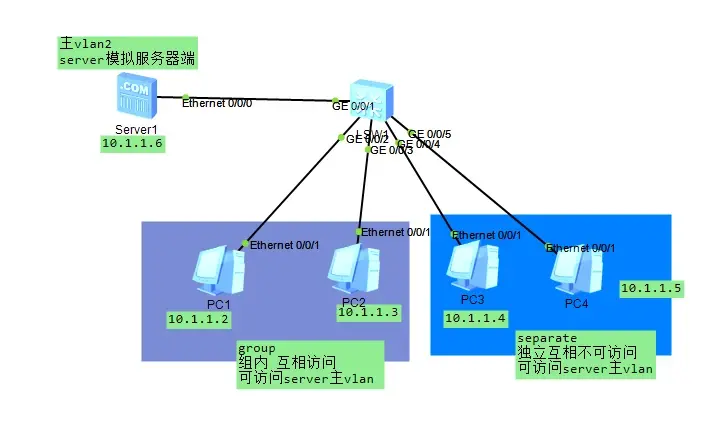
All users can access the server PC1-2 can access each other, PC2-3 cannot access each other PC1-2 and PC2-3 are isolated and cannot access each other
Reference Configuration
- Principal VLAN
[S1]vlan batch 2 201 to 202
[S1]vlan 2
[S1-vlan2] mux-vlan
[S1-vlan2] subordinate separate 202 //Set vlan202 as the separate group, i.e., not intercommunicating
[S1-vlan2] subordinate group 201  //Set vlan201 as the group VLAN, i.e., intercommunicating
[S1]interface GigabitEthernet0/0/1
[S1-GigabitEthernet0/0/1] port link-type access
[S1-GigabitEthernet0/0/1] port default vlan 2
[S1-GigabitEthernet0/0/1] port mux-vlan enable- Group intercommunication
[S1]interface GigabitEthernet0/0/2
[S1-GigabitEthernet0/0/2] port link-type access
[S1-GigabitEthernet0/0/2] port default vlan 201
[S1-GigabitEthernet0/0/2] port mux-vlan enable
[S1]interface GigabitEthernet0/0/3
[S1-GigabitEthernet0/0/3] port link-type access
[S1-GigabitEthernet0/0/3] port default vlan 201
[S1-GigabitEthernet0/0/3] port mux-vlan enable- Separate: independent, no intercommunication
[S1]interface GigabitEthernet0/0/4
[S1-GigabitEthernet0/0/2] port link-type access
[S1-GigabitEthernet0/0/2] port default vlan 202
[S1-GigabitEthernet0/0/2] port mux-vlan enable
[S1]interface GigabitEthernet0/0/5
[S1-GigabitEthernet0/0/3] port link-type access
[S1-GigabitEthernet0/0/3] port default vlan 202
[S1-GigabitEthernet0/0/3] port mux-vlan enable
Verify the Configuration
display mux-vlan //Check whether the mux configuration has taken effect
display vlan	//Check whether the VLAN Type is mux
例如:
VLAN类型:
mux :MUX VLAN中的主VLAN。

mux-sub:MUX VLAN中的从VLAN。

super:VLAN聚合中的Super VLAN。

sub:VLAN聚合中的子VLAN。

common:普通VLAN。

Common:管理VLAN。
If you enjoyed this, leave a comment~