

This chapter records a reference for the IPSec VPN experiment in eNSP
Topology and Requirements
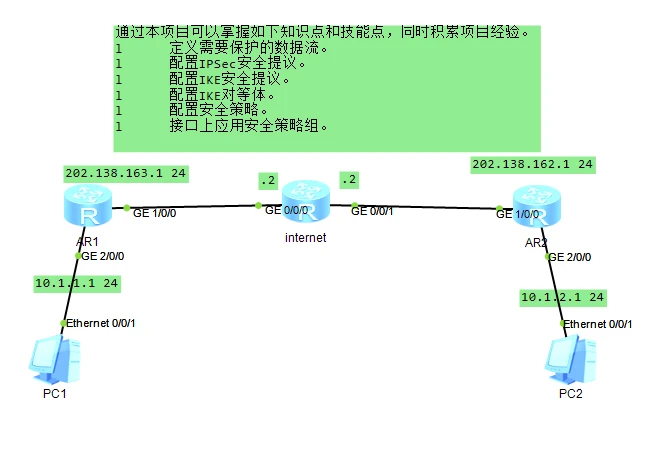
Reference Configuration
IP Configuration Reference
R1
--------------------------
sys
sys R1
un in en
int g1/0/0
ip add 202.138.163.1 24
int g2/0/0
ip add 10.1.1.1 24

-----------------------

R2
--------------
sys
sys R2
un in en
int g1/0/0
ip add 202.138.162.1 24
int g2/0/0
ip add 10.1.2.1 24


-----------------

internet
---------------------
sys
sys Internet
un in en
int g0/0/0
ip add 202.138.163.2 24
int g0/0/1
ip add 202.138.162.2 24
int lo1
ip add 1.1.1.1 24
Static Routes for Full Network Connectivity
R1
-----
ip route-static 0.0.0.0 0.0.0.0 g1/0/0 202.138.163.2

------------------------

R2
-----
ip route-static 0.0.0.0 0.0.0.0 g1/0/0 202.138.162.2
Configure NAT
R1:
acl num 3000
rule 20 permit ip source 10.1.1.0 0.0.0.255
int g1/0/0
nat outbound 3000
R2:
acl num 3000
rule 20 permit ip source 10.1.2.0 0.0.0.255
int g1/0/0
nat outbound 3000
Configure ACLs to Define the Traffic Needing IPSec Protection
Define the traffic going from subnet 10.1.1.0/24 to subnet 10.1.2.0/24. Also exclude the VPN traffic in NAT.
Actually, when I tested it, NAT did not take effect at all
R1:
acl num 3101
rule permit ip source 10.1.1.0 0.0.0.255 destination 10.1.2.0 0.0.0.255
//Define that 10.1.1.0 is allowed to reach the 10.1.2.0 destination network
quit
acl num 3000
rule 10 deny ip source 10.1.1.0 0.0.0.255 destination 10.1.2.0 0.0.0.255
//Deny the specified IP from reaching the destination network
Same as above, no explanation R2:
acl number 3101
rule permit ip source 10.1.2.0 0.0.0.255 destination 10.1.1.0 0.0.0.255
quit
acl number 3000
rule 10 deny ip source 10.1.2.0 0.0.0.255 destination 10.1.1.0 0.0.0.255
Configure the IPSec Security Proposal and Protection Method
The knowledge section explains this; here is just a brief description for easier understanding R1:
ipesc proposal tran1 //Create a security proposal
transform esp  //Specify the security protocol
esp authentication-algorithm sha2-256 //Authentication
esp encryption-algorithm aes-128 //Encryption
encapsulation-mode tunnel  //Set to tunnel mode
R2:
ipesc proposal tran1
transform esp
esp authentication-algorithm sha2-256
esp encryption-algorithm aes-128
encapsulation-mode tunnel
Note: when configuring, both ends must use consistent authentication and encryption types.
Configure the IKE Security Proposal
Detailed explanation in the knowledge section
R1:
ike proposal 5 /Create an IKE security proposal, numbered 9
authentication-method pre-share //Authentication method: pre-shared key
encryption-algorithm aes-cbc-128 //Authentication algorithm
authentication-algorithm sha1   //Encryption algorithm
dh group5  IKE key negotiation uses 1024-bit Diffie-Hellman
quit

ike peer R2 v1 //Version v1, the IKE security proposal called R2
ike-proposal 5 //Numbered 5
pre-shared-key cipher huawei@123  //Pre-shared key value
exchange-mode main //IKE main mode
remote-address 202.138.162.1 //Peer address for negotiation
local-address 202.138.163.1  //Local address for negotiation
R2:
ike proposal 5
authentication-method pre-share
encryption-algorithm aes-cbc-128
authentication-algorithm sha1
dh group5
quit

ike peer R1 v1
ike-proposal 5
pre-shared-key cipher huawei@123
exchange-mode main
remote-address 202.138.163.1
local-address 202.138.162.1
Configure the Security Policy
Click to open Official detailed explanation
Brief explanation here for easier understanding
R1:
ipsec policy map1 10 isakmp // Create an ISAKMP-mode IPSec security policy
ike-peer R2  //Reference the IKE peer
proposal tran1   //Reference the IPSec security proposal
security acl 3101     //Reference the ACL in the IPSec security policy
tunnel local 202.138.163.1 //Local address of the IPSec tunnel
sa trigger-mode auto //Configure the IPSec tunnel trigger mode to automatic
quit
Explanation same as above R2:
ipsec policy map1 10 isakmp
ike-peer R1
proposal tran1
security acl 3101
tunnel local 202.138.162.1
sa trigger-mode auto
quit
Apply the Security Policy
R1:
[R1]interface gigabitethernet 1/0/0
[R1-GigabitEthernet1/0/0]ipsec policy map1
R2:
[R2]interface gigabitethernet 1/0/0
[R2-GigabitEthernet1/0/0]ipsec policy map1
Knowledge Points
In real environments, connections between different branches of a company generally use IPSec VPN encryption; the most commonly used encryption method is ESP ESP (Encapsulating Security Payload) encapsulates the security payload.
Click to open Official experiment
Click to open DH group corresponding bits
Click to open Official detailed guide document
ipsec proposal ipsec    /Create an IPSec security proposal
transform esp   /The security protocol is ESP (default value); the default is esp, AH, or AH-ESP
esp authentication-algorithm sha2-256  /Configure the authentication algorithm of the ESP protocol
esp encryttion-algorithm aes-256    /Configure the encryption algorithm of the ESP protocol
encapsulation-mode tunnel  /Configure the encapsulation mode for data as tunnel mode (default value)
//Although encapsulation-mode tunnel was specified, the corresponding configuration is not shown when displaying it. Because HW defaults to tunnel mode, it is not displayed.
//Encapsulation mode: tunnel (tunnel - *default) transport (transport mode)

ike peer R2 v1 //Version v1, the IKE security proposal called R2
ike proposal 10   /Create an IKE security proposal, numbered 9
authentication-method pre-share    /Configure the authentication method of the IKE security proposal: pre-shared key
authentication-algorithm sha2-256  /Configure the authentication algorithm of the IKE security proposal
encryption-algorithm aes-256   /Configure the encryption algorithm of the IKE security proposal
dh group2    /Configure IKE key negotiation to use 1024-bit Diffie-Hellman
// Corresponding bits: https://support.huaweicloud.com/vpn_faq/vpn_08_0223.html

sa duration 5657   /Configure the lifetime of the IKE SA: 5657


ike peer ipsec       /Create an IKE peer
undo version 2    /By default both v1 and v2 are enabled with v1 used by default; remove v2 support
ike-proposal 10     /Reference the IKE security proposal
pre-shared-key cipher ipsec  /Configure the pre-shared key password
lifetime-notification-message enable   /Enable sending notification messages about the IKE SA lifetime
local-id-type fqdn /Configure the local ID type as a name form during IKE negotiation
local-id l2tp  /Configure the local ID value during IKE negotiation as: playplus
remote-id-type fqdn   /Configure the remote ID type as a name form during IKE negotiation
remote-id l2tp     /Configure the remote ID value during IKE negotiation as: playplus
remote-address 202.138.162.1 //Configure the local IP address during IKE negotiation
local-address 202.138.163.1  //Configure the peer IP address or domain name during IKE negotiation

exchange-mode aggressive  /Set the IKEv1 phase 1 negotiation mode to aggressive mode
///Only IKEv1 main mode supports digital envelope authentication.
/// main: main mode, provides identity protection.
/// aggressive: aggressive mode, negotiates faster but provides no identity protection.


ipsec policy-template ipsectemplate 100    /Configure a policy template named ipsectemplate, numbered 100
route inject dynamic       /Dynamic route injection
proposal ipsec          /Reference the IPSec security proposal: ipsec
ike-peer ipsec       /Reference the IKE peer: ipsec
pfs dh-group2     /Enable the PFS feature during negotiation to improve communication security


ipsec policy ipsecsecurtiy 10 isakmp template ipsectemplate    /Create a security policy numbered 10 and reference the policy template. Security policy name: ipsecsecurtiy


interface dialer 1        /Enter the dialer interface for dynamic domain name resolution
ipsec policy playsecurtiy        /Reference the IPSec security policy
///Note
ipsec authentication sha2 compatible enable/Enable the SHA-2 algorithm compatibility feature to fix the issue where IPSec traffic fails to pass when the vendors of the devices at the two ends of the IPSec tunnel differ, or the product versions at the two ends differ, since different vendors or different products may use different encryption/decryption methods
Note
In this experiment, NAT was not in effect, but the traffic excluded by NAT still reached its destination.
acl num 3000 rule 10 deny ip source 10.1.1.0 0.0.0.255 destination 10.1.2.0 0.0.0.255
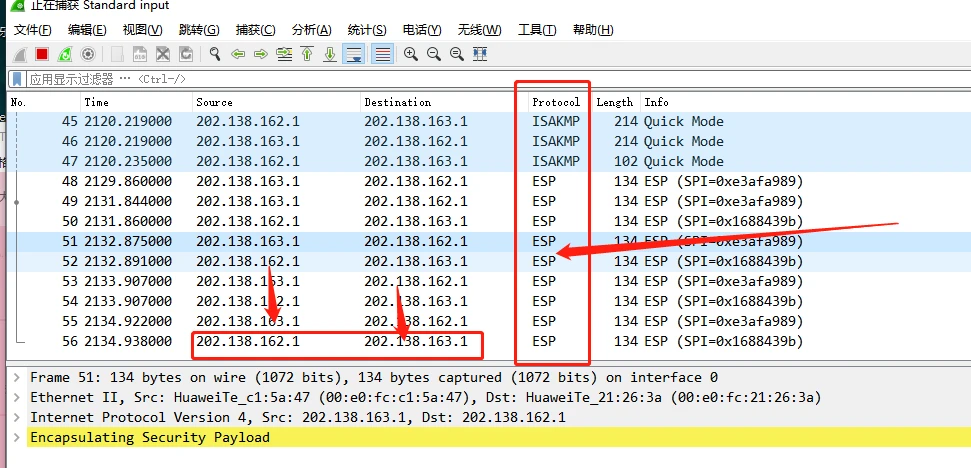
The final packet capture shows the protocol as ESP, with both source and destination addresses hidden. The entire path goes through the VPN.
If you enjoyed this, leave a comment~